TDSO112A
TDSO112A is a program written in Tcl / Tk to control the DSO112A oscilloscope. Although it is still a WIP, it is fully functional and extends the capabilities of this small oscilloscope by adding:
- Different spectrograms
- High-frequency trigger support (nonexistent in hardware: see the oscilloscope documentation User Manual: Setup Trigger)
- Protocol decoding: UART, DHT11… WIP
- Waveform saving via CSV
Documentation and drivers: DSO112A
You can find the documentation for this small oscilloscope at DSO112A.
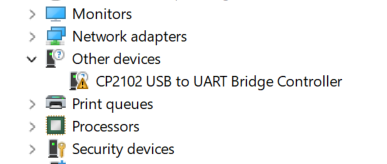
For communication to work, you need to install the drivers if you do not already have them.
Starting TDSO112A
Before starting the program, connect the oscilloscope to USB and wait for it to boot.
You can now launch the tdso112a.bat file from the command line, or double-click tdso112a.exe and then run-clients.exe.
Tip
If the automatic configuration did not work, you will need to delete the serial_port.txt file (or alternatively specify the serial port manually if necessary, for example COM3). In any case, if it did not work, it indicates that you have a driver problem.
Version 1.x
Here you can see the general operation of this version of the oscilloscope.
Version 1.2
Reading the protocol of the DHT11 humidity and temperature sensor. Reading UART.
Version 1.3
Reading UART using Sigrok-cli. This version is much more flexible than v1.2 thanks to the integration of Sigrok. In theory, any possible UART configuration can be used. For example, -P uart:baudrate=9600:format=hex -P uart:baudrate=9600:format=bin -A uart=rx-data indicates that we want to see the data annotations in hexadecimal and below them the binary format (we can stack different data views), from rx-data. To see the available options, we can run sigrok-cli.exe -P uart --show. More documentation at Protocol_decoder:Uart.
Warning
In this version I have disabled, for the moment, the DHT11 decoder. The idea is to use Protocol_decoder:Am230x taking advantage of the new integration.
Version 1.3.1
Reading the protocol of DHTX/AM230X humidity and temperature sensors using Sigrok.
Warning
In order to decode this protocol, the external trigger must be used.
If you have read Sigrok’s documentation on this, you will see that a minimum sampling rate of 200 ksps is required. With that number of samples and our limited 1024-point buffer, the numbers do not work out, since only when the MCU pulls the data line from HIGH to LOW, the line stays in that state for 18 ms…
The trick I used is to use an external trigger that fires 16 ms after the MCU changes the data line to LOW. In theory, all of this was unnecessary if we simply used a rising edge, since it only occurred at the beginning of the data transmission.
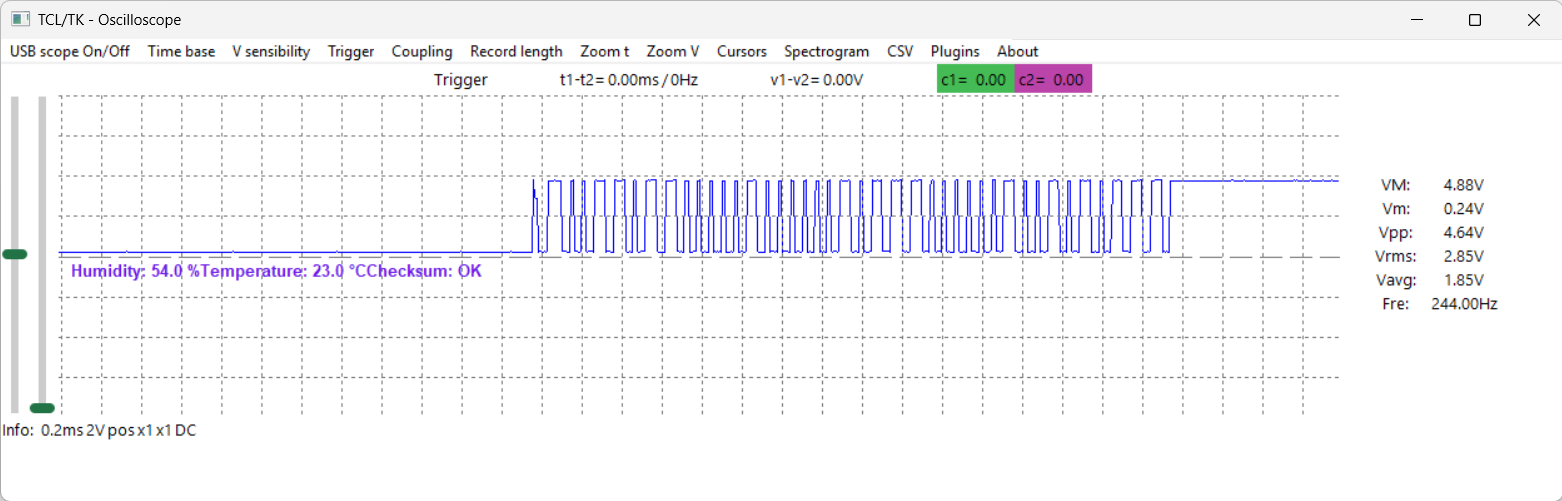
but it turns out that there is a small pulse, which I did not know existed, at the beginning of the transition.
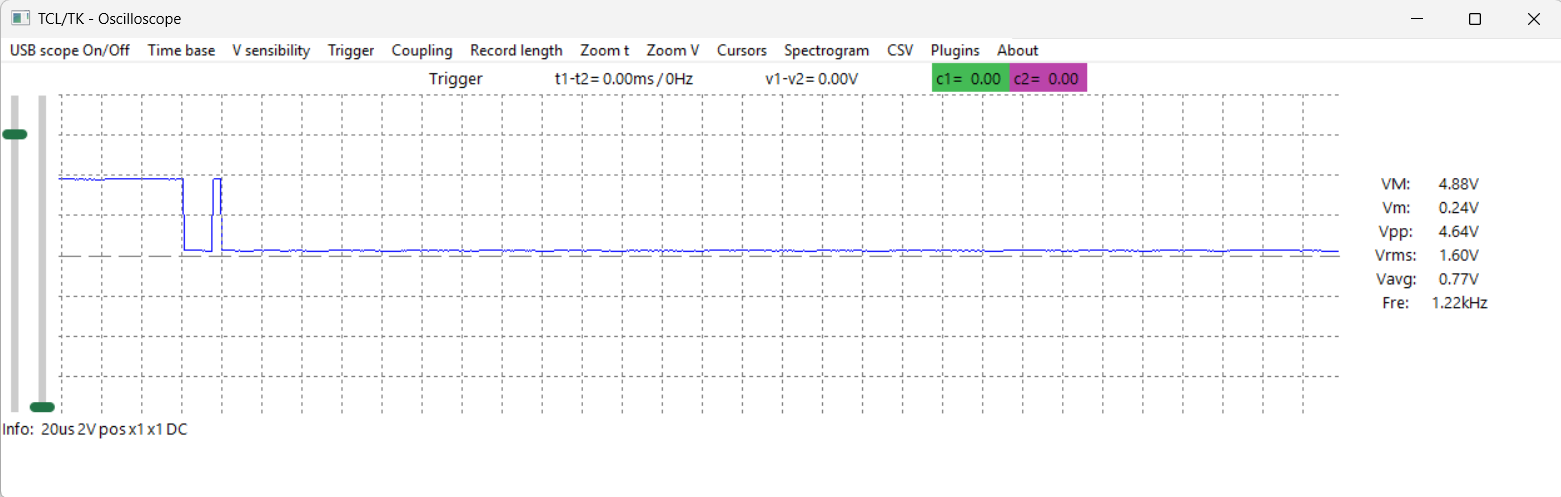
To be honest, I do not know whether this is some kind of error in my hardware, but I had never seen it before. In fact, the strategy of using the rising edge had never failed me before; the hardware is exactly the same and no changes of any kind have been made.
Having to use an external trigger means having to modify the typical Arduino program used with this sensor in order to add a pin to output the trigger pulse, add an interrupt to detect when the MCU pulls the data line low, add a timer — perhaps millis() could have been used, but I wanted something accurate — and the Timer interrupt to create our artificial trigger.
Thanks to the external trigger, we start sampling 16 ms after the line goes low, and we have more than enough time to examine all the data.
The next necessary modification was to change the Sigrok decoder very slightly. To be honest, I think the decoder is very well written, and that made things easier for me. I embedded the modifications directly into the version included with TDSO112A. They could have been integrated instead of overwriting parts of the code… but I think this way is simpler, and it is also something so specific that I do not think it is worth doing it any other way.
Basically, I changed the timings so that they would fit 125 ksps and changed the initial state. I also fixed a small error in the options, but it is not worth mentioning.
How it works
The architecture is client/server, where the server (the main program) is responsible for communicating with the oscilloscope and sending the data to the clients (which are the plugins). Basically, the data consists of the values received from the ADC and the sampling frequency currently being used.
The tdso112a.bat file is responsible for starting the server and the different clients. After startup, 2 windows will appear:
- The oscilloscope window
- run-clients
Why are there two windows and the tdso112a.bat file?
The main development setup uses the interpreter itself: tclsh dso112a.tcl. The main program creates a server that sends/receives data to/from the different clients (Discrete Hartley Transform, DHT, along with simple calculations such as RMS, VMax, VMin, etc.; the DHT11 humidity and temperature sensor protocol, the UART protocol, and anything else we can think of). These clients perform the complex calculations and notify the main program when they are ready to be displayed. This allows complete independence between the GUI and the calculations, and it is also as simple as launching exec tclsh client-measures.tcl & for, for example, DHT decoding and the usual measurements.
When using freewrap to create the executable, this is no longer possible as-is, and 2 executables are needed instead (which is actually also good, since both are independent).
Since the original intention was never to create an executable, none of this was taken into account, but it is true that having an executable makes the program easier to use.
When will the source code be available?
In principle, before the end of the year, although as I said, if you know some Tcl/Tk, you already have it available. Of course, each new version will include changes.
Updates
I will keep updating the software and this help page whenever I have time, but I can already say that the next updates are:
Version 1.3.1
- Reading the DHTX/AM230X protocol thanks to the integration with Sigrok.
Version 1.3
- Integration of sigrok-cli. For now it is being used only for UART.
- DHT11 protocol decoding has been disabled.
Version 1.2
- UART protocol 9600bps 8N1. For now it is very limited, but that does not make it any less useful.
Version 1.1
- DHT11 protocol
Version 1.0
- Initial version. It contains all the oscilloscope features without plugins:
- Full (or almost full) control of the DSO112A
- Software fixes for firmware issues such as the inability to trigger at high frequencies (mentioned in the documentation) or inconsistencies in command-based control (reported by other programmers).
- Automatic measurements: VM, Vm, Vpp, Vavg, Fre
- Time and voltage measurements using cursors
- Waveform saving via CSV
- Different spectrograms using the DHT
Project page
Road Map
- Adapt the code so it works with a modified DSO183 (using relays and transistors to control the oscilloscope via software). In principle, this does not seem to be possible… a pity.
- The same for the DSO138. I still have to test it, but in this case it does not seem it will be useful because apparently the data transmission is not continuous.
I want to experiment with the graphical environment and give the interface a more attractive look, simply for pleasure (and for learning), because obviously as an engineer, I only care about functionality, although it is true that a pleasant appearance improves things. By this I DO NOT mean that I dislike what Tk offers me by default; I simply want to experiment and improve my skills. One interface that strongly appeals to me is that of PicoScope 7.
About the name
The spelling of the name in Spanish is suggestive… and it is also a Tcl/Tk development built around a Digital Storage Oscilloscope…
Contact
If you have any suggestions or questions, I am available at: tdso112a at hykrion com